
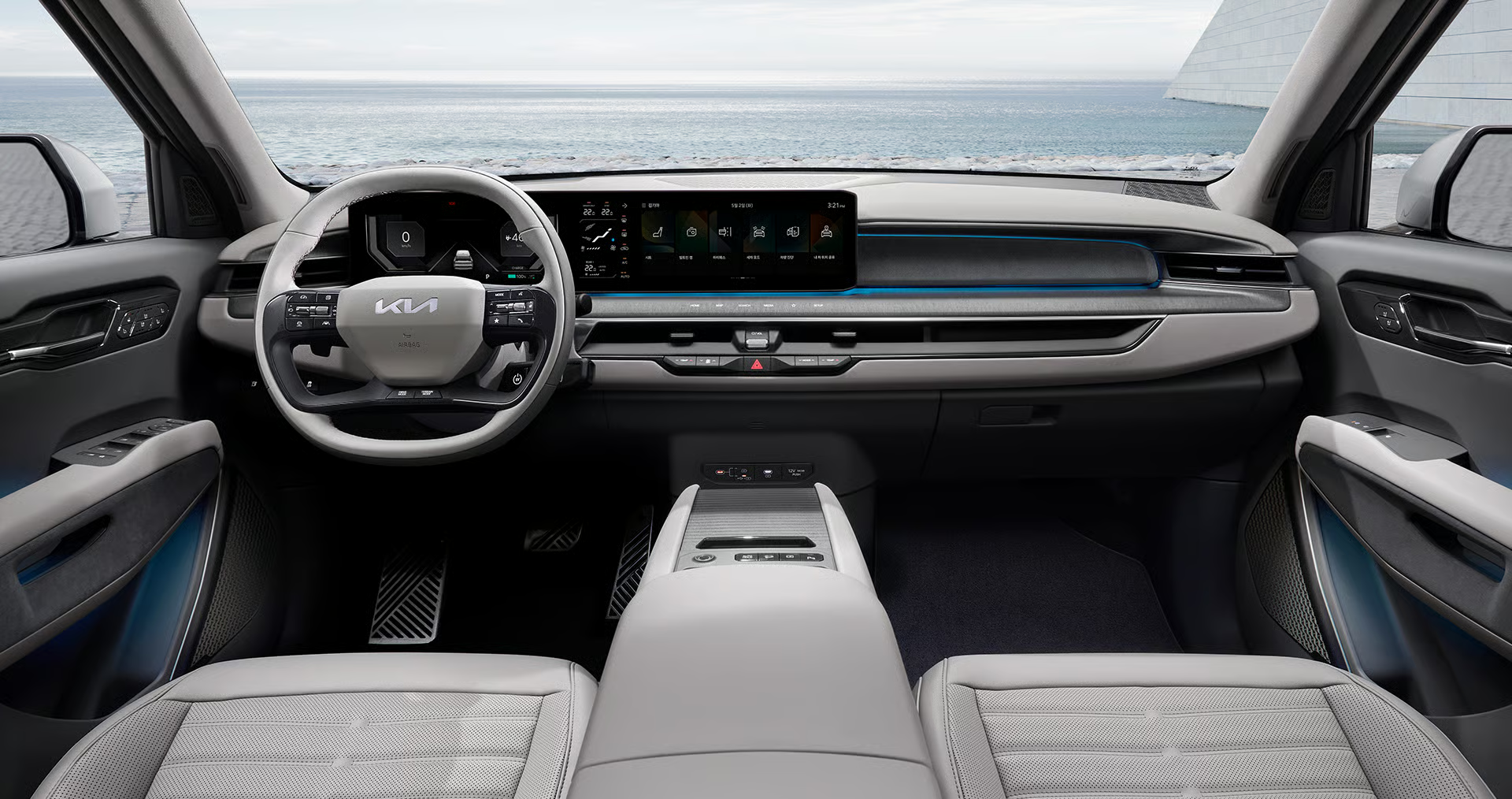
The Kia EV9 infotainment review starts with one simple point: this cabin asks the screen to do a lot.
It handles navigation, media, phone projection, vehicle settings, and connected-service prompts in a three-row electric SUV.
That makes the interface more than decoration. It shapes how calm the EV9 feels on a normal family drive.
The short verdict: the EV9 has one of the stronger screen-first cabins, if you judge it with realistic expectations.
Fast answer: what makes the EV9 infotainment system strong
The Kia EV9 infotainment system works best because it feels built around everyday tasks, not only showroom impact. The wide dashboard layout gives the driver a clear digital environment, while the central screen area supports the jobs most owners repeat: route guidance, audio, phone connection, vehicle settings, and connected-service access.
This is not the same as saying every EV9 owner will see identical behavior. Feature availability can depend on market, model year, trim, phone, software version, subscription status, account setup, and service coverage. The safer way to judge the EV9 is to test the exact vehicle and phone setup you plan to use.
For most shoppers, the key question is practical: can you get in, start guidance, connect a phone, adjust common settings, and understand alerts without feeling like the car is making you study it? On that standard, the EV9 has a strong case.
Why the infotainment system matters in the EV9
In a large electric SUV, infotainment is not just entertainment. It is the daily control layer for route planning, media, phone calls, charging habits, vehicle settings, and connected features. If that layer feels confusing, the whole car can feel heavier than it should.
The EV9 also has a family-car problem to solve. Different drivers may use different phones. Passengers may ask for music changes. Navigation may be running while climate, charging, or driver-assistance settings are also on the mind. A good interface reduces friction in those moments.
That is where the EV9 feels convincing. Its broad display environment makes the cabin feel modern, but the more useful win is that important tasks have obvious places to live. The system still rewards a short setup session, especially for phone projection and connected services, but it does not feel like technology added after the car was designed.
How the EV9 screen layout works in daily use
Kia presents the EV9 with a wide front dashboard display layout that combines driver information and infotainment context across the cabin. In practice, the driver is not relying on a tiny central screen for everything. Vehicle information and media or navigation context feel visually connected.
For a buyer, the layout matters in three ways.
First, glanceability. A large, clear screen area makes it easier to check the current function without hunting through small menus.
Second, separation. Driver information, entertainment, and vehicle settings should not feel like one messy pile. The EV9 layout helps those jobs feel more organized.
Third, passenger usability. In a three-row SUV, the front passenger often becomes the navigator or media helper. A screen system that is easy to read from the front row makes that role less annoying.
The tradeoff is familiar to modern cars: the more the vehicle depends on screens, the more important it becomes to learn the home screen, shortcuts, phone projection behavior, and update path early.
Phone projection: CarPlay and Android Auto are still central
For many owners, the best infotainment system is the one that gets out of the phone’s way. Apple CarPlay and Android Auto remain important because they bring familiar maps, audio, calls, messages, and compatible apps into the car display.
Apple says CarPlay can work through supported vehicle controls such as a touchscreen, knobs, buttons, a touchpad, or Siri, depending on the vehicle. Apple also lists compatible models separately, so buyers should check the model year and market context for the exact EV9 they are considering.
Android Auto has similar practical limits. Google describes Android Auto as a way to bring maps, media, calls, texts, and compatible apps to the car display. It also depends on a compatible car or stereo, a compatible Android phone, an active data plan, and the required connection method. Wireless Android Auto adds another dependency: the phone and vehicle setup both have to support it.
The practical takeaway is simple: do not evaluate the EV9 infotainment system only from the built-in menus. Pair the phone you actually use. Start navigation. Play audio. Make a call if safe. Then switch back to the Kia interface and see whether the transition feels clear.
Kia Connect and connected features need careful expectations
Kia Connect is part of the broader ownership experience, but it should be treated as a service layer with conditions, not as a universal promise. Kia’s owner information describes connected-service features and plan context, while also making clear that availability can vary.
That matters because connected features often depend on more than the screen in the dashboard. They can involve account setup, app setup, subscription status, vehicle support, cellular and GPS coverage, software version, and market availability.
For a shopper, the useful question is narrow: which connected features are active on this exact vehicle, under which plan or service terms, and with which phone setup? For an owner, the best starting point is the official Kia owner resources and the vehicle’s own software and account screens before assuming a feature is missing or broken.
The EV9’s infotainment system feels strongest when connected features are treated as useful additions, not as the only reason the cabin works.
Software updates: check the official path before guessing
Modern infotainment systems change over time, and the EV9 is no exception in principle. Kia provides an official navigation and software update portal where owners can check supported update information by vehicle or VIN path, depending on the market and tool flow.
That does not mean every complaint has a software fix. It also does not mean every vehicle, region, or software version gets the same update at the same time. The careful approach is to check the vehicle’s current software information, review Kia’s official update resource, and keep notes about the symptom before contacting support or service.
A useful note is specific: what screen was open, what phone was connected, whether the issue happened at startup or mid-drive, and whether it repeated after a clean restart of the task. That kind of detail is more useful than saying the infotainment system is bad.
Practical checks before you judge the EV9 infotainment system
If you are test-driving the EV9, spend five extra minutes with the screen. That small test will tell you more than a spec sheet.
Try this sequence:
- Start from the home screen and find navigation without help.
- Pair the phone you actually use, or ask the seller to demonstrate the connection process.
- Launch Apple CarPlay or Android Auto if your phone supports it and the vehicle is configured for it.
- Start a route, then switch to audio and back to navigation.
- Open vehicle settings and look for the controls you expect to adjust often.
- Check whether connected-service features require an account, plan, app setup, or later activation.
- Ask where software version information and update guidance are found.
This is not a stress test. It is a normal-driver test. If the system feels calm during these basic tasks, it is more likely to feel good after the first week of ownership.
If something feels wrong during setup
A screen-first cabin is easier to judge when you separate symptoms instead of treating every issue as one vague infotainment problem.
If the phone reacts but the EV9 screen does not change, focus first on the connection method, compatibility context, and whether the vehicle is in the right projection or media area.
If navigation starts but audio behaves unexpectedly, separate the map task from the audio task. Start one function cleanly, then add the second one and watch where the behavior changes.
If a feature appears once and then disappears, note the startup sequence, phone connection state, account status, and whether the issue repeats after beginning the task again from the home screen.
Those examples do not diagnose every case. They make the next conversation with owner support, a dealer, or service staff more useful because the problem is described as a repeatable pattern.
Common mistakes when evaluating the EV9 screen
The first mistake is judging the system from photos alone. The EV9 cabin photographs well, but infotainment quality depends on response, layout logic, phone behavior, and how easy it is to recover from a wrong tap.
The second mistake is assuming phone projection tells the whole story. CarPlay and Android Auto are important, but owners still need Kia’s built-in interface for vehicle settings, connected-service context, update information, and some car-specific functions.
The third mistake is treating availability as universal. A feature that appears in one EV9 video, market, model year, or trim may not be active in every vehicle. Connected services are especially sensitive to account, region, subscription, and coverage conditions.
The fourth mistake is expecting updates to be magic. Updates can matter, but they are not a guaranteed fix for every complaint. Check official Kia resources and describe the issue clearly before assuming the answer.
Privacy, service, and cost context
Infotainment systems now sit close to personal data. Phone projection can expose contacts, messages, navigation destinations, voice controls, and app activity through supported interfaces. Connected services can involve account data, vehicle status, location-related functions, cellular service, and app permissions.
That does not make the EV9 unusual. It does mean owners should set up the system deliberately. Use the official Kia, Apple, Android Auto, and Google resources for account, device, and compatibility guidance. Review phone permissions. Remove old paired phones before selling or returning a vehicle. Ask about connected-service terms before relying on a feature.
Cost also deserves attention. Connected services may involve plans or subscription conditions depending on the feature, vehicle, market, and account status. Treat the infotainment screen as the starting point, then check the current service details through official owner resources.
Verdict: top of the class for practical screen-first usability
The Kia EV9 infotainment system is strongest when judged as a practical family-EV interface. It gives the cabin a modern screen environment, supports familiar phone projection paths, and connects the built-in interface to broader Kia services and update resources.
Its limits are the same limits that define many current connected vehicles. Availability varies. Phone behavior depends on devices and connection methods. Connected features depend on setup and service conditions. Updates should be checked through official channels rather than guessed.
Even with those limits, the EV9 makes a strong impression because the technology feels central to the car’s daily usefulness. It is not just a big display. It is the control surface for how the EV9 fits into real routines.
Sources
- Kia EV9 official product page: https://www.kia.com/us/en/ev9
- Kia EV9 official Korea product features: https://www.kia.com/kr/vehicles/ev9/features
- Kia Connect official owner information: https://owners.kia.com/content/owners/en/about-uvo-link.html
- Kia official navigation and infotainment software update portal: https://update.kia.com/US/EN/home
- Apple CarPlay official page: https://www.apple.com/ios/carplay/
- Apple CarPlay available models: https://www.apple.com/ios/carplay/available-models/
- Apple Support: Use CarPlay with your iPhone: https://support.apple.com/en-us/108415
- Android Auto official page: https://www.android.com/auto/
- Android Auto vehicle compatibility: https://www.android.com/auto/compatibility/vehicles/
- Google Help: Get started with Android Auto: https://support.google.com/androidauto/answer/6348019?hl=en
Related articles
- What Is the Kia Connected Car Navigation Cockpit?
- BMW iDrive vs. CarPlay vs. Android Auto
- Nissan Connect Infotainment System: How User-Friendly Is It?
- VW’s rebooted MIB4 driver interface tested: does it work?
FAQ
Is the Kia EV9 infotainment system easy to use?
It is generally easy to understand for core tasks such as navigation, audio, phone projection, and vehicle settings. The best test is still hands-on: pair your own phone and try the features you use every day.
Does the Kia EV9 support Apple CarPlay?
Apple lists Kia EV9 support on its CarPlay available-models resource, but buyers should check the exact model year, market, phone, software, and vehicle configuration before relying on a specific setup.
Does the Kia EV9 support Android Auto?
Android Auto support depends on a compatible vehicle setup, Android phone, data plan, and connection method. Google’s compatibility and setup resources are the right starting point for checking details.
Are Kia Connect features included on every EV9?
Connected-service availability can vary by model, trim, market, account setup, plan, subscription status, coverage, and software version. Check official Kia owner resources for the exact vehicle.
Should owners update the EV9 infotainment software?
Owners should check Kia’s official update resources and the vehicle’s software information before making assumptions. An update can be relevant, but it should not be treated as a guaranteed fix for every issue.