
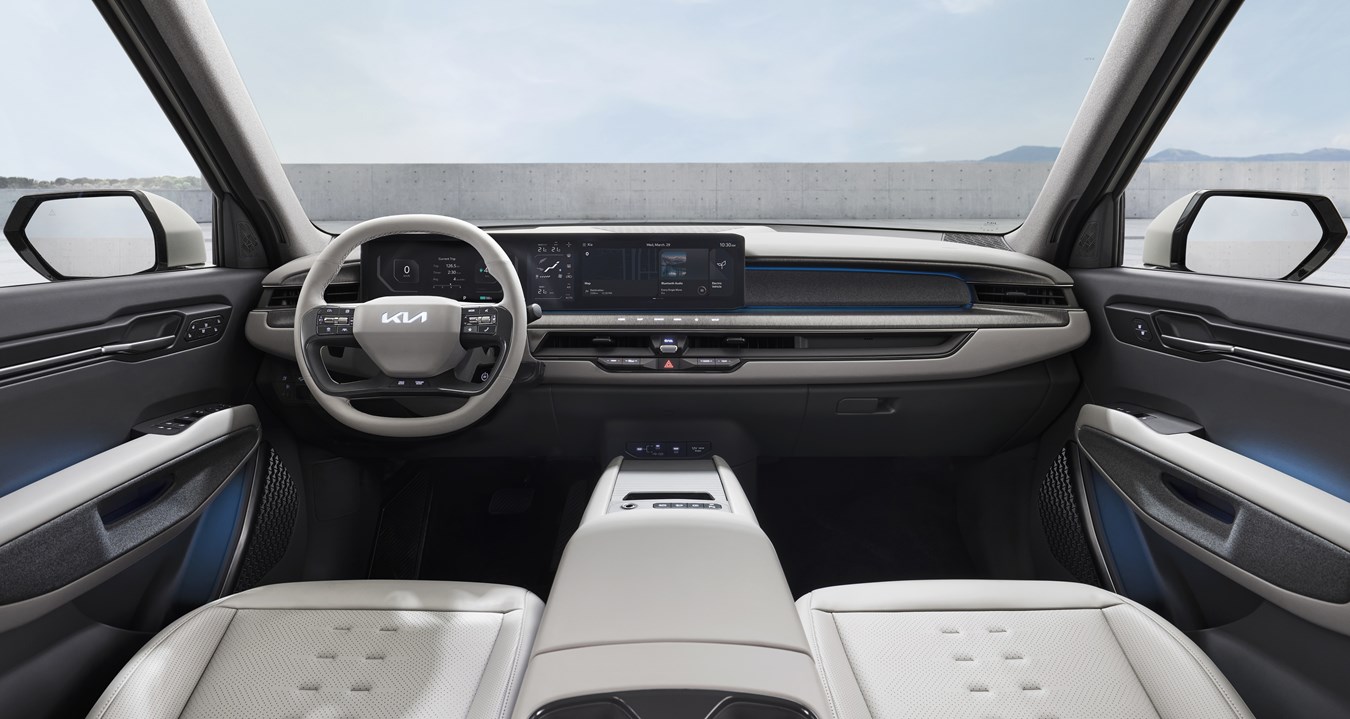
Kia ccNC is easy to misunderstand because the name sounds larger than a normal infotainment system.
It stands for Connected Car Navigation Cockpit.
Kia uses the term around the vehicle’s screen-based cockpit experience.
That does not mean every Kia with ccNC behaves the same way.
It also does not mean ccNC is the same thing as a Kia Connect subscription or app service.
A better way to think about ccNC is this: it is the in-car navigation and infotainment environment for supported Kia vehicles. It shapes how the driver interacts with screens, navigation, phone projection, vehicle settings, and software-related surfaces where those features are equipped.
The useful part is not memorizing the acronym. The useful part is knowing what ccNC is responsible for, what sits beside it, and why two Kia vehicles can both mention ccNC while still having different features.
What Kia ccNC Means
ccNC stands for Connected Car Navigation Cockpit. Official Kia and Hyundai Motor Group materials place it in the context of infotainment, navigation, cockpit controls, and software-supported vehicle interfaces.
In plain English, ccNC is the software environment behind a supported Kia’s central screen experience. It is where navigation, media, certain vehicle settings, phone projection, and update-related surfaces may come together.
The word "cockpit" matters. Kia is not just describing a map app. It is describing the broader driver-facing interface inside the vehicle.
That is why ccNC can appear in owner-support, navigation-update, and infotainment-manual contexts. It is part of how the vehicle presents digital controls and connected functions to the driver.
What ccNC Is Not
ccNC is not a promise that every feature works the same way in every Kia.
It is not a guarantee of a specific screen size, exact menu layout, or identical update behavior.
It is not the same thing as Kia Connect.
That distinction prevents a lot of confusion. ccNC describes the in-car cockpit and infotainment environment. Kia Connect is the connected-services side of the ownership experience, including app-based and subscription-related services where available.
A Kia can have an infotainment system with ccNC branding while the exact connected-service package, trial terms, remote features, and availability depend on the vehicle, market, model year, trim, software, hardware, and service plan.
Why Kia Uses a Cockpit Name
Modern vehicle screens do more than show radio stations. They can bring together maps, media, phone projection, settings, driver information, and update prompts.
Kia’s ccNC naming reflects that larger role. The screen is part of the cockpit, not just an accessory in the dashboard.
For a driver, ccNC is best understood as the place where several digital vehicle experiences meet. You may use it when changing media, checking navigation, connecting a phone, or working through supported update and owner-support flows.
For a shopper, ccNC is worth noticing, but not as a standalone yes-or-no feature. The better question is what the specific Kia model and trim actually includes.
How ccNC Relates to Kia Connect
ccNC and Kia Connect are related in the ownership experience, but they are not the same layer.
ccNC is the cockpit-facing infotainment and navigation environment. Kia Connect is Kia’s connected-services ecosystem, which may involve app access, remote features, subscriptions, cellular coverage, GPS availability, and service terms depending on the vehicle and market.
The easiest way to separate them is by asking where the feature lives.
If the question is about the vehicle’s screen interface, navigation display, phone projection surface, or infotainment menus, you are probably thinking about ccNC.
If the question is about remote app functions, connected-service packages, subscriptions, or account-based services, you are probably thinking about Kia Connect.
Some owner experiences may involve both. A software or connected feature can touch the in-car interface while also depending on service eligibility or account setup. That is why the distinction matters before comparing vehicles.
How ccNC Relates to Software Updates
Kia’s official update and owner-support surfaces show that infotainment software updates are part of the broader ownership experience.
That does not mean every ccNC-equipped vehicle receives the same updates in the same way. Update behavior can depend on equipment, region, software version, service status, and the specific Kia involved.
The practical takeaway is simple: ccNC belongs in the conversation when you are thinking about Kia infotainment software, navigation support, and cockpit-interface behavior.
It should not be treated as a blanket promise that one update method, one schedule, or one feature change applies across every vehicle.
How ccNC Relates to Apple CarPlay and Android Auto
Apple CarPlay and Android Auto are phone-projection experiences. Kia’s ccNC web manual context includes phone projection, but exact behavior can vary by vehicle and setup.
That means ccNC can be the interface where phone projection appears, but it does not automatically tell you whether a specific Kia supports wired projection, wireless projection, or the same behavior as another model.
For owners, the practical move is to check the exact vehicle’s manual, infotainment guide, or Kia support material before assuming how phone projection should work.
For shoppers, the practical move is to check the feature on the actual model and trim being considered, not only from the ccNC name.
Why Features Can Vary Between Kia Vehicles
Two vehicles can share a broad software family and still behave differently.
That happens because vehicle technology depends on more than the infotainment name. Hardware, market, model year, trim, software version, service package, and local availability can all affect what the driver sees.
This is especially important with connected features. A screen interface, an app service, and a subscription package can be connected in daily use, but they are not the same thing.
So if one Kia owner sees a feature in a video or forum post, that does not prove the same feature is present in another Kia. The model-specific owner material matters more than the acronym.
What to Check When Comparing Kia Tech
Start with the model and trim, not just the infotainment name.
Then check the official specs, owner manual, Kia Connect information, and navigation-update support for that vehicle. Those sources are more useful than assuming every ccNC mention points to the same feature set.
A careful comparison should separate four questions:
- What infotainment and navigation interface does the vehicle use?
- What phone projection behavior is listed for that vehicle?
- What Kia Connect services are available for that model and market?
- What update support or owner-support pathway applies to that vehicle?
This keeps the research practical. Instead of asking whether ccNC is "good" in the abstract, you are asking what the exact Kia in front of you can do.
Related articles
- The Essential Guide to Kia Advanced Driver Assistance Systems (ADAS)
- Highway Driving Assist (HDA)
- Hyundai CarPlay Not Working? Here’s How to Actually Fix It
- Volkswagen Infotainment Not Working: Reasons And Fixes
- Ford Connected Vehicle Features Not Working
The Bottom Line
Kia ccNC means Connected Car Navigation Cockpit. It is Kia’s cockpit-facing navigation and infotainment environment for supported vehicles.
The key is to avoid turning the name into a feature guarantee. ccNC can be central to the screen experience, but Kia Connect services, phone projection behavior, software updates, and feature availability can still vary.
If you are reading about a specific Kia, treat ccNC as the starting point. Then check the model, trim, market, software, and service details before making decisions about the technology package.
FAQ
What does Kia ccNC stand for?
Kia ccNC stands for Connected Car Navigation Cockpit. It refers to Kia’s cockpit-facing navigation and infotainment environment for supported vehicles.
Is ccNC the same as Kia Connect?
No. ccNC is the in-car cockpit and infotainment environment. Kia Connect is the connected-services side, including app-based or subscription-related services where available.
Does ccNC guarantee wireless Apple CarPlay or Android Auto?
No. Phone projection behavior can vary by model, market, trim, hardware, and software. Check the exact vehicle’s official materials.
Do all Kia ccNC vehicles get the same software updates?
No. Update behavior can vary by vehicle, equipment, region, software version, and service context.
Why do ccNC features differ between Kia models?
Vehicle features depend on hardware, model year, trim, market, software, and service package. The ccNC name alone does not define the full feature set.