
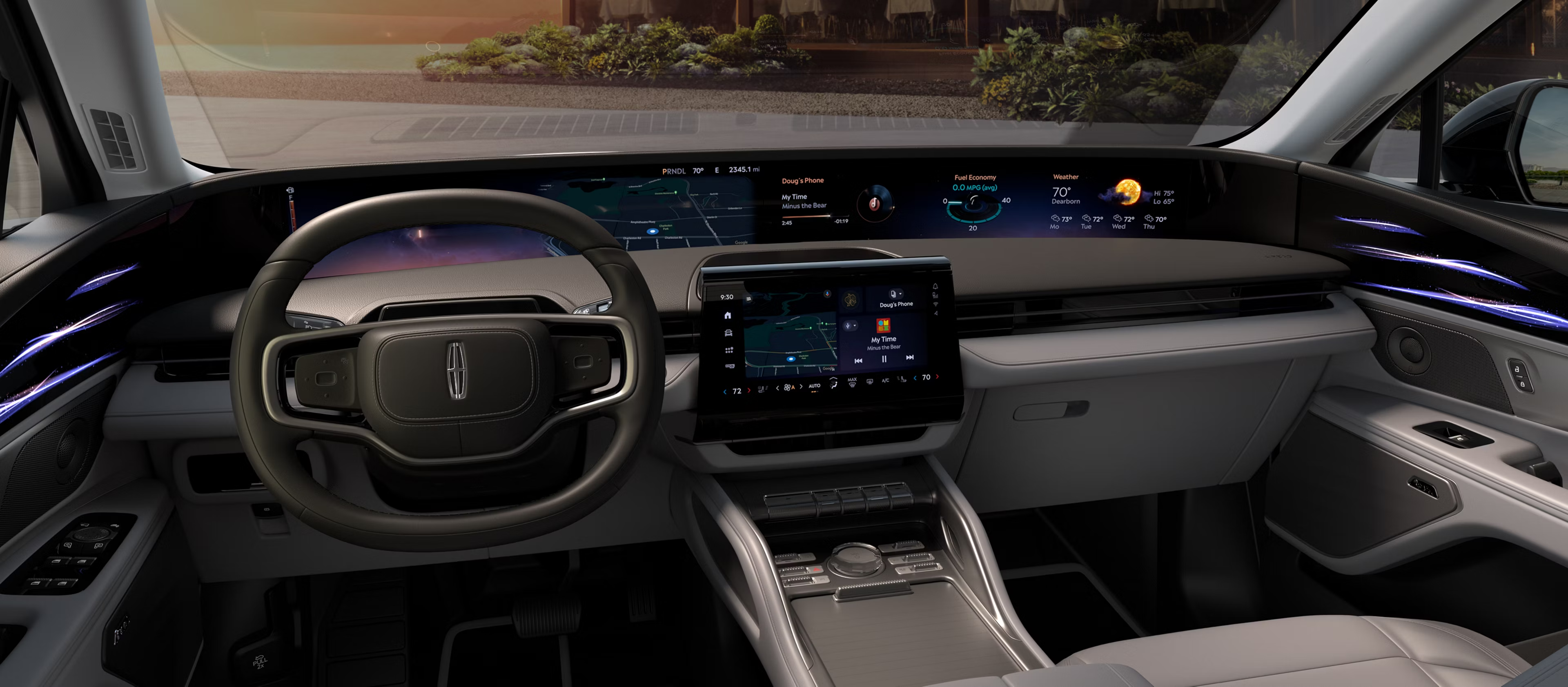
Ford and Lincoln are making the dashboard screen feel more like a connected device, not just a radio and map.
That sounds useful, but it also raises practical questions before you buy or update a vehicle.
Which apps are built in? What still depends on your phone? What only works when parked?
Here is the plain-English guide to Ford Digital Experience and Lincoln Digital Experience, with the limits that matter.
The Fast Answer
Ford Digital Experience and Lincoln Digital Experience are newer infotainment platforms designed to bring more built-in apps, Google services, voice features, navigation, media, and connected functions into the vehicle screen.
They do not automatically make every Ford or Lincoln behave the same way. App availability, trial periods, subscriptions, connectivity, screen layout, market, trim, account setup, and model year can all affect what you actually see.
For shoppers, the main point is simple: treat the system as three overlapping experiences. There is the vehicle’s built-in software, there are Google services in compatible cars, and there is phone projection through Apple CarPlay or Android Auto when supported.
That distinction matters more than the screen size.
Why This Matters Before You Buy
A modern infotainment system now affects daily driving in ways older car radios did not. It can shape how you navigate, stream audio, answer calls, use voice control, manage profiles, and keep passengers entertained while parked.
It can also affect cost and convenience. Some services may depend on data, subscriptions, trials, a compatible phone, a signed-in account, or a specific connectivity package.
The best way to read Ford and Lincoln’s newer infotainment pitch is not as one universal app store for every vehicle. Read it as a more capable dashboard platform whose exact behavior still depends on the car and setup in front of you.
How Ford and Lincoln Digital Experience Works
Ford describes Ford Digital Experience as a vehicle technology platform with built-in Google services, supported apps, media, connectivity, and phone projection features. Lincoln uses similar positioning for Lincoln Digital Experience, with a luxury-focused interface and model-specific presentation.
In practical terms, the system can combine several layers:
- Built-in vehicle software for the main screen experience.
- Google services where supported, such as Google Maps and Google Assistant features in compatible cars.
- Supported in-car apps that may run on the vehicle screen.
- Apple CarPlay for compatible iPhones on supported vehicle displays.
- Android Auto for compatible Android phones on supported vehicle displays.
That does not mean every feature is always available, free, or identical. The important buyer question is not just whether the vehicle has the named system. It is what the specific vehicle, trim, package, market, phone, and account setup actually support.
Built-In Apps Are Not The Same As Phone Projection
The easiest way to avoid confusion is to separate built-in apps from phone projection.
A built-in app runs through the vehicle’s infotainment environment. It may depend on the vehicle’s data connection, the automaker’s app support, a user account, or a subscription.
Apple CarPlay and Android Auto are different. They project a compatible phone experience onto a supported car display. Your phone, operating system, cable or wireless setup, app permissions, and vehicle compatibility still matter.
This is why a shopper should not assume that a favorite phone app will work the same way in every Ford or Lincoln screen. The same general category, such as music, navigation, or messaging, can appear differently depending on whether it is built in or coming from the phone.
What About Video And Entertainment?
Ford and Lincoln’s newer infotainment messaging includes more entertainment-oriented features, but the safe way to understand that is parked-use context.
Do not treat video, games, meetings, or streaming as driving features. A responsible dashboard experience should keep driver attention on the road while the vehicle is moving.
For a buyer, the useful question is narrower: what entertainment works when the vehicle is parked, what apps are available on the exact model, and whether those apps require connectivity, a subscription, or a separate account.
The Lincoln Nautilus is a useful example because Lincoln publicly highlights its wide panoramic display and center touchscreen as part of the cabin experience. That makes the system feel more like a large connected display, but it still does not remove the need to check exact availability.
What To Check On A Ford Or Lincoln Lot
Before judging the system, sit in the exact vehicle you are considering and check the software like you would check the seats or cargo area.
Start with the home screen. Look for the apps and services you expect to use every week: navigation, audio, voice control, phone calls, messaging, profiles, and settings.
Then check phone projection. If you use an iPhone, confirm Apple CarPlay behavior on that vehicle. If you use Android, confirm Android Auto behavior. Do not assume that a salesperson’s demo phone reflects your own setup.
Next, ask what requires a trial, subscription, data connection, hotspot plan, app account, or connected-services activation. The screen may look ready on day one, but some services can depend on account and connectivity choices.
Finally, ask what is included on that trim and model year. A feature shown in marketing for one Ford or Lincoln model should not be treated as a guarantee for every vehicle carrying the brand badge.
Common Mistakes To Avoid
The first mistake is judging the system only by screen size. A huge display can be impressive, but daily usefulness depends on layout, responsiveness, app support, voice control, and how easily you move between built-in tools and phone projection.
The second mistake is assuming built-in Google services replace Apple CarPlay or Android Auto. They can coexist on supported vehicles, but they serve different roles.
The third mistake is treating app names as permanent. In-car app availability can change with region, model, software, account status, licensing, and service support.
The fourth mistake is expecting entertainment features to work while driving. Keep video and similar content in the parked-use bucket unless the vehicle clearly presents it as passenger-safe and road-legal in that situation.
The fifth mistake is ignoring setup time. A connected car may need account sign-ins, phone pairing, permissions, privacy choices, and software updates before the infotainment system feels complete.
Privacy, Data, And Cost Context
More connected software usually means more choices about data, accounts, and services.
If you plan to use built-in navigation, voice features, streaming apps, hotspot functions, or vehicle profiles, read the setup screens carefully. Look for what data is used, which account is signed in, and whether a trial becomes a paid service later.
For families, profile setup can matter. A shared vehicle may need different phone pairings, app accounts, contact access, navigation preferences, and privacy settings for different drivers.
For used-car shoppers, reset and account status matter too. Make sure the previous owner’s profiles and app accounts are removed through the vehicle’s normal reset process, then set up your own services cleanly.
Related Articles
- Kia EV9 Infotainment Review: Top Of The Class
- Hyundai’s New Infotainment System Uses One Massive Screen
- BMW iDrive vs. CarPlay vs. Android Auto
- Nissan Connect Infotainment System: How User-Friendly Is It?
Bottom Line
Ford Digital Experience and Lincoln Digital Experience make the dashboard more app-like and more connected, especially where Google services, supported apps, and large screens are part of the vehicle package.
The buyer-friendly takeaway is not that every Ford or Lincoln now has the same software experience. It is that the infotainment system deserves a proper test before you commit.
Check the exact model. Try your own phone. Ask about subscriptions and connectivity. Treat parked entertainment separately from driving features. That gives you a much clearer picture than marketing screenshots alone.
FAQ
Does Ford Digital Experience replace Apple CarPlay?
Not necessarily. Ford’s official Digital Experience materials include Apple CarPlay support language for supported vehicles, so shoppers should check the exact vehicle and phone setup.
Is Lincoln Digital Experience the same as Android Auto?
No. Lincoln Digital Experience is the vehicle’s infotainment environment. Android Auto is phone projection for compatible Android phones on supported car displays.
Can you watch video on Ford or Lincoln infotainment while driving?
Treat video and similar entertainment as parked-use features. Do not assume streaming, games, meetings, or video content are available while driving.
Do all Ford and Lincoln models get the same apps?
No. App availability and feature behavior can vary by model, trim, market, software, account, connectivity, subscription status, and setup.
What should shoppers check first?
Check the exact model’s built-in apps, your own phone projection, account requirements, trial periods, data needs, and parked entertainment limits before buying.