
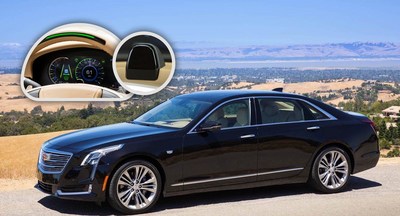
Driver assistance features can make a modern car feel smarter, calmer and more watchful.
They do not turn the vehicle into a self-driving machine.
The real change is more practical: the car can warn, support and sometimes intervene sooner than a distracted driver might.
That difference matters when you compare technology packages, read trim lists or decide which features are worth understanding before a test drive.
Why driver assistance features matter now
Driver assistance features sit between basic safety equipment and automated driving claims. That middle ground is where many buyers get confused.
A vehicle may advertise lane support, blind-spot alerts, adaptive cruise control, emergency braking or parking sensors. Those names sound simple, but each system depends on sensors, software logic, driver alerts and the way the automaker tunes the feature.
The useful question is not whether the car can drive itself. For consumer technology shoppers, the better question is what the vehicle can help the driver notice, avoid or manage during ordinary driving.
Safety organizations such as NHTSA and IIHS describe advanced driver assistance systems as support technologies, not replacements for attention. Consumer Reports also evaluates how these systems communicate limits to the driver, which can be as important as the feature name itself.
Cabin technology shapes the safety experience
The cabin is where driver assistance features become understandable or frustrating.
A warning that appears at the right time, in the right place, with a clear sound or visual cue can help the driver react. A warning that feels vague or buried in a screen can be easier to miss.
That is why the instrument cluster, steering wheel controls, camera views, driver monitoring alerts and dashboard messages matter. The same feature can feel very different depending on how clearly the vehicle explains what it is seeing.
Some cars use simple icons for lane markings, nearby vehicles or blind-spot activity. Others add larger displays, head-up information or more detailed camera views. The best daily setup is not always the flashiest one. It is the one the driver can understand without staring away from the road.
Screens, controls and software change how features feel
Driver assistance features depend on software, but drivers experience them through menus, buttons, alerts and screens.
A lane keeping system may need a dashboard icon to show whether it is ready. Adaptive cruise control may show the selected following distance. A blind-spot system may use mirror lights, dashboard warnings or sound. Parking assistance may combine camera views with distance alerts.
This is where infotainment design and vehicle safety technology overlap. If the driver has to dig through too many menus, the feature may be present but awkward to use. If the display makes status clear, the same system feels more trustworthy.
Software updates can also change how a vehicle presents or manages certain technology features. That does not mean every car receives the same capability changes. It means buyers should treat screens and controls as part of the technology package, not as decoration.
What driver assistance features usually include
Most driver assistance discussions group several technologies under the ADAS label.
Forward collision warning looks ahead and warns the driver about a possible frontal conflict. Automatic emergency braking may apply braking in some situations if the driver does not respond in time. These systems are designed as support, not as a promise that every crash can be avoided.
Lane departure warning alerts the driver when the vehicle appears to drift from its lane. Lane keeping assistance may add steering support. Lane centering can help keep the car positioned more steadily within a lane when system conditions are met.
Blind-spot warning watches adjacent areas that may be hard to see in the mirrors. Rear cross-traffic alert can help when backing out of a parking space or driveway. Parking sensors and cameras can make low-speed maneuvering easier, especially in tight spaces.
Adaptive cruise control adjusts speed in relation to traffic ahead when active. More advanced highway assistance packages may combine adaptive cruise, lane centering and driver monitoring, but the driver remains responsible for supervision.
Platform and powertrain context still matters
Driver assistance technology does not live in isolation. It sits on top of the vehicle platform, electrical architecture, braking system, steering system, cameras, radar, ultrasonic sensors and software.
That is why two cars can advertise similar feature names but behave differently. One may provide smoother lane support. Another may show clearer screen messages. A third may reserve certain features for specific trims or packages.
Electric vehicles and newer platforms often bring more software-focused dashboards, over-the-air update conversations and larger sensor suites. Gasoline vehicles can still offer strong driver assistance packages, but the surrounding interface may differ.
For a shopper, the feature list is only the first layer. The real comparison is how the system communicates, how easy it is to activate, how naturally it disengages and how clearly the vehicle reminds the driver to stay involved.
Daily use: what changes behind the wheel
In daily driving, driver assistance features are most useful when they reduce small moments of uncertainty.
On a busy road, a blind-spot alert can help confirm that another vehicle is nearby. In stop-and-go traffic, adaptive cruise control can reduce some repetitive speed adjustments. During highway travel, lane support can make the car feel steadier when conditions are clear.
Parking technology is another practical example. Camera views, sensors and rear cross-traffic alerts can help the driver understand what is around the vehicle at low speed. They do not replace mirrors, shoulder checks or judgment, but they add another layer of information.
The limits matter just as much as the benefits. Road markings, glare, heavy rain, snow, construction zones, dirty sensors and unusual traffic situations can affect how well systems operate. A good driver assistance package should make those boundaries clear instead of hiding them.
What to compare before choosing a vehicle
When comparing driver assistance features, start with the feature names, then go deeper.
Check whether the vehicle offers forward collision warning, automatic emergency braking, blind-spot warning, lane support, adaptive cruise control, parking sensors, camera views and driver monitoring. Then look at how those systems are presented inside the cabin.
A test drive can reveal details a spec sheet cannot. Notice whether alerts are clear, whether icons are easy to understand, whether controls are close at hand and whether the car explains when a system is unavailable.
Also compare how the feature is packaged. Some vehicles make certain driver assistance tools standard, while others bundle them by trim or option package. Availability can vary by model, market and configuration, so the exact vehicle matters.
The strongest technology package is not just the one with the longest list. It is the one that gives the driver useful information, communicates limits clearly and fits naturally into ordinary driving.
Read more
- Highway Driving Assist (HDA)
- The Essential Guide to Kia Advanced Driver Assistance Systems (ADAS)
- Volkswagen Atlas Tech Review: Screens, Driver Assistance, and Family SUV Usability
- Volkswagen ID.4: EV Platform, Charging, Software, and Safety Tech
FAQ
Are driver assistance features the same as self-driving?
No. Driver assistance features support the driver with warnings, alerts or limited intervention. They do not remove the driver’s responsibility to supervise the vehicle.
Which driver assistance features are most useful every day?
Blind-spot warning, automatic emergency braking, adaptive cruise control, lane support, parking cameras and rear cross-traffic alerts are among the features many drivers notice in routine use.
Why do the same feature names feel different in different cars?
Automakers use different sensors, screens, alerts, controls and software tuning. Two vehicles can list similar features but communicate and respond differently.
Can weather or road conditions affect driver assistance features?
Yes. Heavy rain, snow, glare, unclear lane markings, construction zones and dirty sensors can affect how some systems detect the road or surrounding traffic.
What should I check on a test drive?
Watch how clearly the car shows system status, how easy the controls are to use, whether alerts are understandable and how the vehicle explains unavailable features.