
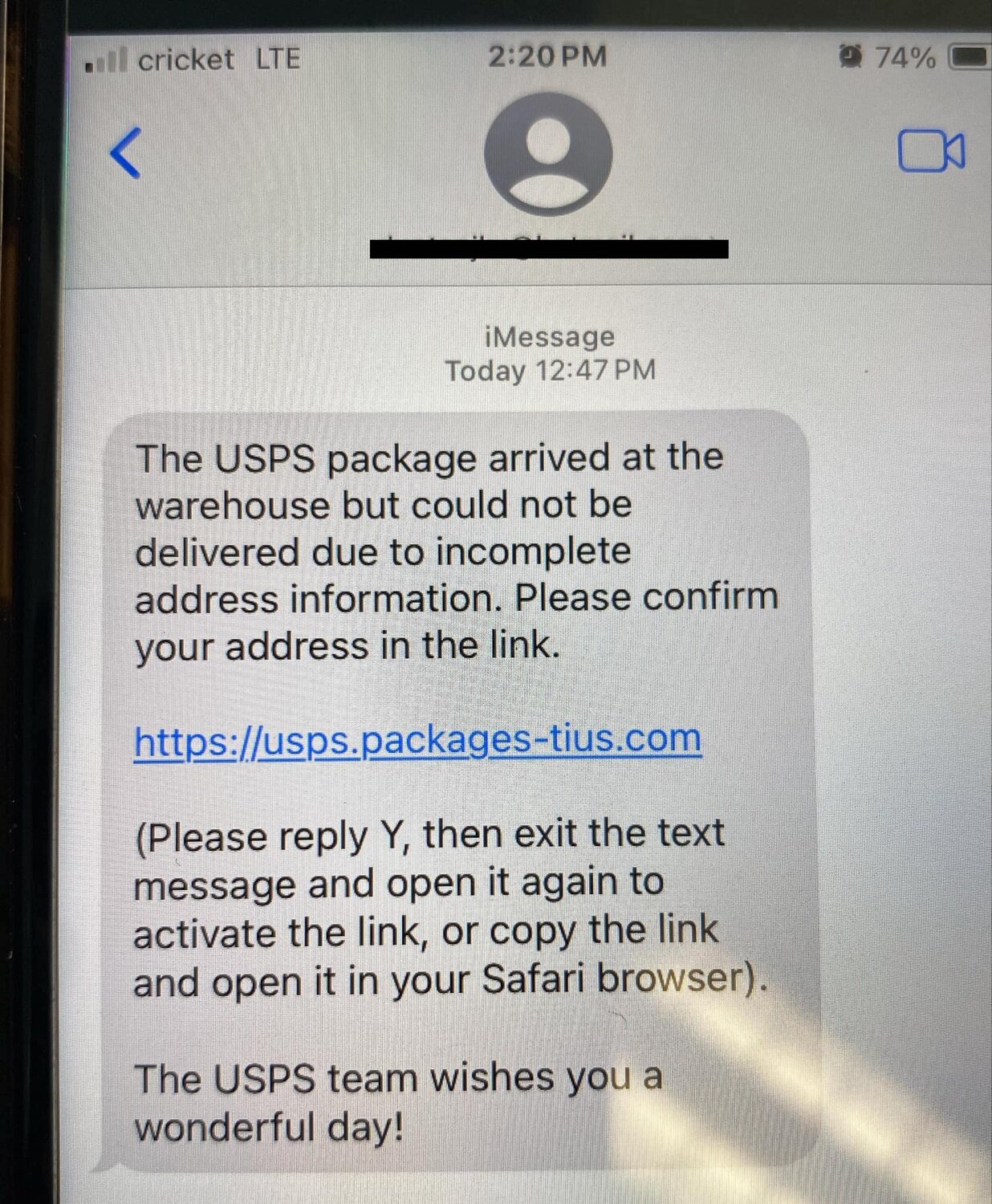
A package delivery scam text works because it arrives at the exact moment you might be expecting something.
The message looks urgent. A package is delayed, a fee is due, or an address needs correction.
Before you tap, slow the situation down. Most warning signs are easier to see outside the text thread.
This guide shows how to check package delivery scam texts safely, what to do next, and when to report them.
The outcome: decide without tapping the link
The goal is not to become a fraud investigator. It is simpler: decide whether the message deserves any action without opening the link, replying, or sharing information.
A safer outcome looks like this:
- You inspect the message for common warning signs.
- You verify any real delivery issue through the carrier’s official site or app.
- You report or delete the suspicious text.
- You take extra steps only if you already tapped or entered information.
The Federal Trade Commission warns that spam texts often try to get people to click a link or share personal information. The U.S. Postal Inspection Service describes package-tracking text scams as smishing, a phishing attempt delivered by text message.
Before you start: do not use the message as your starting point
Treat the text as an untrusted prompt, even if it names a familiar carrier or includes a tracking-style phrase.
Do not tap the link to "see what happens." Do not reply "STOP" unless you already know the sender is legitimate. Do not copy a code, pay a small fee, or enter an address from a page opened through the text.
Instead, leave the message untouched and start from a trusted place: the shipping company’s official website, its official app, your order confirmation email, or the retailer account where you bought the item.
That one habit removes the scammer’s strongest advantage: making their link feel like the fastest path.
What you need to check safely
You do not need special security software to do the first pass. You need a few pieces of context:
- Whether you are actually expecting a package.
- The real tracking number from your order confirmation or carrier account.
- The official carrier website or app, typed directly or opened from your saved app.
- Your phone’s built-in spam reporting option, if available.
For reporting, Apple explains that iPhone users may be able to report junk or spam messages in the Messages app. Google says Messages can help detect spam and lets users report spam from suspicious conversations.
Those reporting tools are useful, but they do not replace the main safety rule: verify through the carrier or retailer directly.
Step 1: read the message for pressure, not just branding
Scam texts often borrow the language of delivery problems: failed delivery, unpaid fee, wrong address, held package, customs issue, or final notice.
Brand names and logos are not enough. A scammer can mention USPS, FedEx, UPS, Amazon, or another familiar name without having any real connection to your order.
Look for pressure signals first:
- A demand to act immediately.
- A small fee that supposedly unlocks delivery.
- A threat that the package will be returned.
- A request to update your address through the text link.
- A link that does not match the official carrier domain.
The USPIS specifically warns about package-tracking text scams that ask recipients to click links. FedEx also tells customers to report suspicious communications and avoid interacting with fraudulent messages.
Step 2: compare the link with the real carrier path
Do not judge the link only by whether it contains a carrier name. Scammers can place familiar words inside unrelated domains.
A suspicious link may:
- Use extra words before or after a brand name.
- Use a shortened URL.
- Point to a domain that is not the carrier’s official site.
- Mix tracking, payment, or address language into an unfamiliar web address.
- Use odd punctuation, misspellings, or unnecessary subdomains.
A real delivery issue should still be visible when you open the carrier’s official app or type the carrier’s official website yourself. If the text says your package is stuck but the official tracking page does not show that issue, do not follow the text link.
This is the cleanest test because it checks the claim without trusting the sender.
Step 3: verify the tracking number outside the text
If the text includes a tracking number, do not assume that makes it real. Copying a number into a search engine can also lead you into low-quality or misleading pages.
Use the tracking number you already have from the retailer, carrier app, order confirmation email, or account page. If the text’s number is different, treat that as a warning sign.
If you cannot find a matching order, the safest answer is usually no action. A scam text does not become more credible because it creates urgency.
Step 4: check what the message asks you to provide
Package delivery scam texts often become dangerous after the tap. The linked page may ask for information that a scammer can use later.
Be especially cautious if the page asks for:
- A credit or debit card number.
- A bank login.
- Your Social Security number.
- A one-time security code.
- Your full address plus payment details.
- An account password.
A legitimate delivery company may need information in some real delivery situations, but you should reach that request through the company’s official channel, not through an unsolicited text link.
If the message asks for payment to release a package, treat it as high risk until confirmed independently.
Step 5: report, block, and delete the text
Once the message looks suspicious, do not keep negotiating with it. Report it through the safest available channel, block the sender if your phone offers that option, and delete the message.
The FTC recommends reporting unwanted texts and explains that suspicious messages can be forwarded to 7726, which spells SPAM. Apple and Google also provide device-level ways to report junk or spam messages from supported phones and carriers.
You can also report package-related scams to the carrier being impersonated. FedEx maintains fraud reporting guidance for suspicious emails, texts, and websites. USPS-related package smishing can be reported through USPIS guidance.
The exact reporting path can vary by phone, carrier, and country, so use the official reporting option available on your device or service.
Troubleshooting: what if the message almost looks real?
Some scam texts are sloppy. Others are convincing enough to make you pause. Use the visible symptom to choose the next check.
If the text names a carrier but you are not expecting a package, do not tap. Report and delete it.
If you are expecting a package but the link looks unfamiliar, open the official carrier app or site directly and check the tracking page there.
If the text asks for a small redelivery fee, do not pay through the text link. Verify the issue through the official carrier or retailer account first.
If the text says your address is incomplete, check the order details from the retailer or carrier account you already trust.
If the message includes a tracking number you do not recognize, compare it with your order confirmation instead of opening the link.
If a page opened from the text asks for payment, passwords, or security codes, close it and do not submit anything.
What to do if you already tapped
Tapping a suspicious link is not the same as handing over information, but it is a reason to be careful.
If you tapped but did not enter anything, close the page, do not download files, and do not grant permissions. Then report the message and delete it.
If you entered a password, change that password from the real website or app. If you reused it elsewhere, change it on those accounts too.
If you entered payment information, contact your bank or card issuer using the number on the back of your card or the official app.
If you shared personal information, IdentityTheft.gov provides official recovery steps for identity theft and suspicious exposure.
For a deeper next step, read TechNubo’s guide: What to Do After Clicking a Suspicious Link on Your Phone.
Safer alternatives to using a text link
The safest alternative is to make the text irrelevant. Use a trusted route instead:
- Open the carrier’s official app.
- Type the official carrier website yourself.
- Use the tracking link from your retailer account.
- Check the original order confirmation email.
- Contact the carrier through a phone number or support page found on its official site.
This takes a little longer than tapping, but it answers the same question without trusting a message that could be fake.
For account security around delivery, shopping, and cloud services, also consider strengthening your main email and Google accounts. A safer account makes it harder for a scammer to turn one mistake into a larger problem.
Related articles
- What to Do After Clicking a Suspicious Link on Your Phone
- How to Make Your Google Account Safer in 20 Minutes
- How to Check Whether Your Photos Are Really Backed Up
FAQ
Are all package delivery texts scams?
No. Some delivery texts are legitimate. The safer approach is to avoid the text link and verify the delivery through the carrier’s official website, app, or your retailer account.
What is smishing?
Smishing is phishing through SMS or text messages. In package delivery scams, the message often claims there is a tracking, address, or payment problem.
Should I reply STOP to a suspicious delivery text?
Do not reply unless you already know the sender is legitimate. For an unknown suspicious message, use your phone’s reporting tools, block the sender if available, and delete it.
What should I do if I paid a fake delivery fee?
Contact your bank or card issuer through its official number or app. If you shared personal information, use IdentityTheft.gov for recovery steps.
Can my phone report scam texts?
Often, yes. Apple and Google both describe spam or junk reporting options for supported message apps and carriers. Availability can vary by device, carrier, and region.