
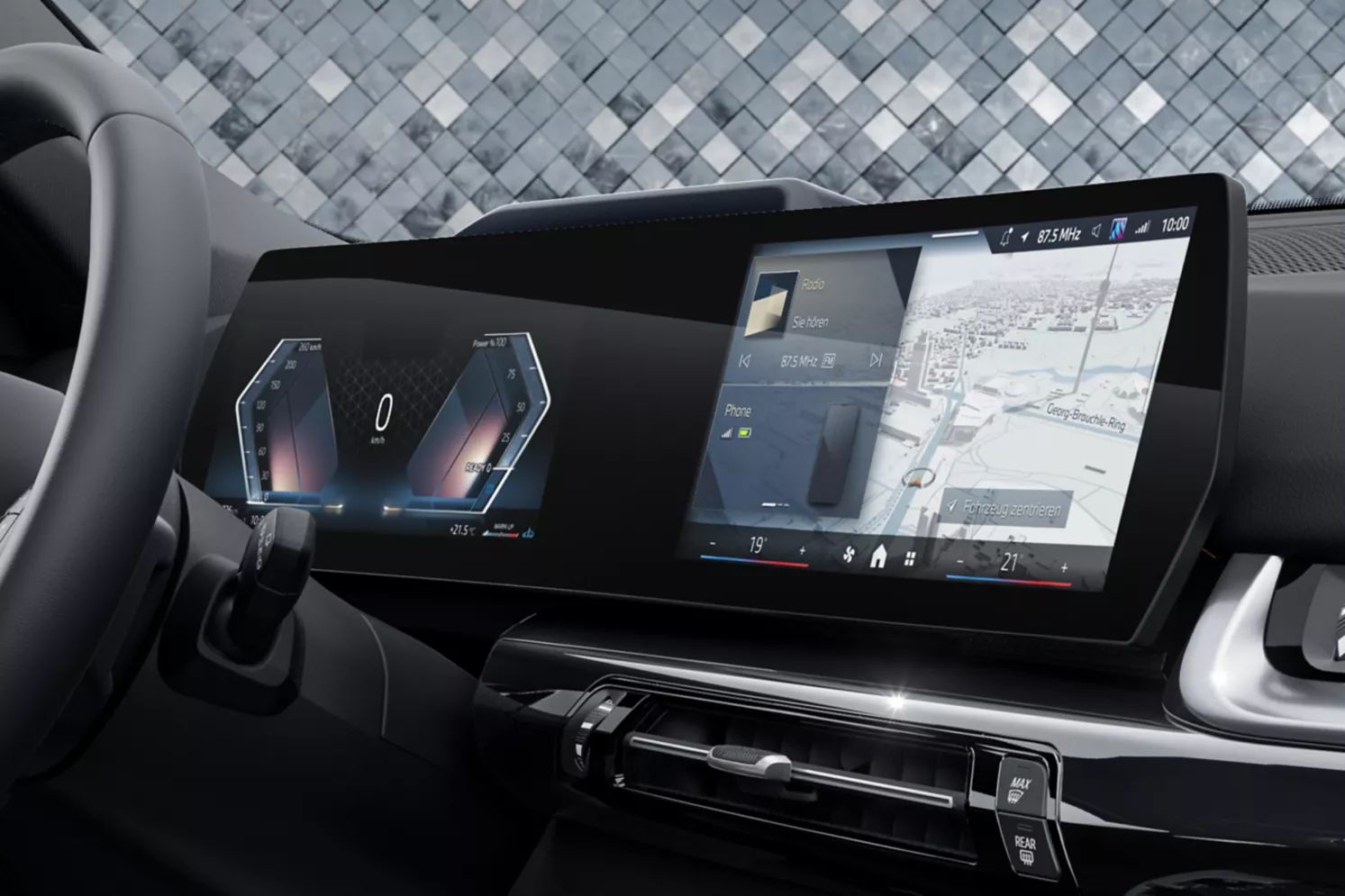
BMW iDrive 9 changes the daily relationship between driver, screen, voice control, apps, and physical shortcuts.
That matters because infotainment is no longer a side feature. Many routine car tasks now start on screen.
This BMW iDrive 9 review focuses on normal use: climate, navigation, media, profiles, phone pairing, and driver-assistance settings.
The key question is simple: does BMW’s newer cabin software make daily driving easier, or just more screen-dependent?
Why iDrive 9 matters
BMW iDrive 9 matters because it shows where BMW’s cabin interface is heading. The system puts more emphasis on the Curved Display, app-style tiles, touch input, voice interaction, and connected services.
That shift changes small moments. A quick errand can involve changing climate settings, confirming a route, switching audio, checking phone projection, or adjusting a driver-assistance view. Those tasks are not glamorous, but they shape whether a modern cabin feels calm or distracting.
The practical value of iDrive 9 depends on how quickly a driver can recover from those tasks. A clean home screen helps. A predictable return path helps more. Physical controls, where available, still matter because they reduce the need to search through menus for common actions.
The cabin is built around the BMW Curved Display
The BMW Curved Display is the visual center of the iDrive 9 cabin experience. It combines the instrument and infotainment areas into a wide digital interface, so the car feels less like a dashboard with a screen added and more like a software-first cockpit.
That brings a clear benefit. Navigation, media, vehicle settings, phone functions, and connected-service tiles can feel more integrated when the layout is easy to scan. It also gives BMW room to update the interface with newer app-style organization and more prominent on-screen controls.
The tradeoff is attention. When more features move into software, the screen has to stay predictable. Drivers should look for fast access to climate basics, clear status information, useful voice commands, and a home layout that does not make simple tasks feel hidden.
Screens, controls, and software: the knob question
The headline change around modern BMW cabins is not just the screen. It is the balance between touch, voice, shortcuts, and the rotary controller.
Some BMW iDrive 9 cabins are more screen-forward, while other BMW cabins still give drivers a controller-based fallback depending on model and configuration. That difference matters more than the software version alone. A driver who likes physical inputs should check the exact vehicle, not assume every iDrive 9 cabin feels the same.
In daily use, the strongest setup gives a driver several ways to complete common tasks: touch when parked or stopped, voice for simple requests, and physical or shortcut access when the road gets busy. If one path is weak, the whole cabin can feel more demanding.
For a test drive, start with the boring tasks. Change temperature. Enter a destination. Switch audio sources. Pair or reconnect a phone. Find driver-assistance settings. Return to the main screen without hunting. Those steps reveal more about iDrive 9 than a short tour of the flashiest menus.
Android Automotive context, without overstating it
Android Automotive is a vehicle infotainment platform based on Android that can run directly on a car’s hardware. It is different from Android Auto, which projects a phone interface onto a vehicle screen.
That distinction matters because many shoppers hear similar names and assume the experience is the same. Android Auto is about phone projection. Android Automotive is about the vehicle’s built-in infotainment foundation.
For this article, Android Automotive is useful as platform context, not as the main driver-facing claim about BMW iDrive 9. The daily experience most owners notice is still the visible BMW interface: screens, menus, voice control, connected services, phone integration, and model-specific control layout.
Connected services are useful when they stay predictable
BMW connected features can include app-linked vehicle functions, digital key features, voice assistant support, connected navigation, phone integration, and subscription-based digital services depending on market, model, trim, package, software, and service terms.
The value is convenience. A driver may want the car to remember profiles, connect the right phone, show the right media source, and keep navigation or connected features easy to reach. When those basics work, the cabin feels modern without demanding much thought.
The risk is fragmentation. If a feature depends on account status, package, phone compatibility, trial period, software version, or market availability, the owner experience can vary. The right question is not only what iDrive 9 can support. It is what the specific vehicle includes and whether the daily controls make sense.
Driver-assistance tech still needs a clear interface
Driver-assistance features are only useful if the driver can understand what the vehicle is doing. The interface should make status, alerts, following-distance settings, lane support, and available assistance modes clear without burying them under unrelated menus.
BMW model pages and reviews show how closely driver-assistance information and cabin technology now sit together. The screen is where many settings, visual cues, and status messages appear. That makes the infotainment interface part of the trust experience, even when the underlying assistance feature is separate from the entertainment system.
This is not a claim that software alone makes driving safer. It is a practical point: drivers need clear information. During a test drive, check whether assistance settings are easy to find, whether icons are understandable, and whether alerts are readable at a glance.
Platform and model context: do not judge iDrive 9 in isolation
BMW iDrive 9 does not exist on its own. It sits inside different vehicles with different cabins, option structures, control layouts, and buyer expectations.
That is why the BMW X1 and BMW X3 are useful comparison points. The X1 shows a compact SUV context where a screen-forward interface can define much of the cabin experience. The X3 gives a broader premium SUV context with its own cabin technology package and control expectations.
Powertrain and platform still matter, but for a technology-focused shopper, the cabin software may shape satisfaction more often than a spec sheet suggests. The better question is not just whether a BMW has iDrive 9. It is whether that vehicle’s screen, controls, phone integration, and connected-service setup match how the driver actually uses a car.
What daily ownership feels like
The strongest part of iDrive 9 is the sense that the car is designed around a modern digital cockpit. The screen looks central. The software can organize many cabin functions in one place. Voice and connected features can reduce friction when they are set up well.
The weaker part is the learning curve that comes with any screen-heavy cabin. If a driver frequently changes settings while moving, a touch-first interface can feel less natural than familiar physical controls. If the home screen is not customized well, simple tasks can take longer than expected.
A useful first week with iDrive 9 should include setup time. Put key shortcuts where they are easy to reach. Pair the main phone. Check profile behavior. Learn the voice commands that actually save taps. Review which connected services are active. Then judge the system after normal routines, not only after the first showroom demo.
What to compare next
Compare BMW iDrive 9 with three things: older BMW iDrive habits, phone projection through Apple CarPlay or Android Auto, and rival infotainment systems from brands such as Volkswagen, Kia, Hyundai, Nissan, and BYD.
The most important comparison is not which interface looks newest. It is which one makes repeated tasks feel calm. If you use built-in navigation, BMW’s native interface matters more. If you live inside phone projection, CarPlay or Android Auto behavior may matter more. If you rely on driver-assistance settings, screen clarity and menu depth become more important.
For buyers, the best test is repeatability. Try the same five tasks in each vehicle and see which cabin makes fewer demands on your attention.
Verdict: iDrive 9 is a cabin software shift, not just a feature list
BMW iDrive 9 is best understood as a shift toward a more screen-led BMW cabin. It can feel polished, modern, and connected when the layout matches the driver’s habits. It can also feel more demanding for drivers who prefer dedicated controls for routine actions.
The send-off for the traditional controller-centered experience is not just nostalgic. It is practical. Physical controls gave BMW a clear identity and a low-friction fallback. With iDrive 9, the software has to earn that trust through layout, responsiveness, voice usefulness, and easy recovery from common tasks.
For most shoppers, the right conclusion is measured. Do not judge iDrive 9 by the size of the display alone. Judge it by how quickly you can live with it.
Related articles
- Driver Assistance Features
- Advanced driver-assistance features ProPILOT
- Volkswagen Infotainment Not Working: Reasons And Fixes
- What Is the Kia Connected Car Navigation Cockpit?
- Hyundai CarPlay Not Working? Here’s How to Actually Fix It
FAQ
Is BMW iDrive 9 the same as Android Auto?
No. Android Auto is phone projection from an Android phone. Android Automotive is a vehicle infotainment platform. BMW iDrive 9 is the BMW cabin interface drivers use on supported models.
Does every BMW with iDrive 9 remove the rotary controller?
No. Control layout depends on the model and configuration. Shoppers should check the exact vehicle, because the presence or absence of a controller changes daily usability.
What is the biggest daily change with BMW iDrive 9?
The biggest change is the stronger focus on screen-based cabin control, app-style software organization, voice interaction, and connected features.
Should I use BMW iDrive 9 or Apple CarPlay and Android Auto?
Use the interface that fits your routine. Built-in BMW features may suit navigation and vehicle settings, while phone projection may suit messaging, media, and familiar apps.
What should I test before buying a BMW with iDrive 9?
Test climate access, navigation entry, phone pairing, media switching, voice control, driver-assistance settings, and the path back to the home screen.
Sources
- BMW USA X1 model page: https://www.bmwusa.com/vehicles/x-series/x1/bmw-x1.html
- BMW USA X3 model page: https://www.bmwusa.com/vehicles/x-series/x3/bmw-x3.html
- Android Open Source Project Android Automotive overview: https://source.android.com/docs/automotive/start/what_automotive
- BMWBLOG, BMW Switches to Open Source Android Automotive OS Coming 2024: https://www.bmwblog.com/2023/01/09/bmw-switches-to-open-source-android-automotive/
- BMWBLOG, Only BMW X1 Models with New Head Unit Will Get iDrive 9: https://www.bmwblog.com/2023/01/07/bmw-x1-models-with-new-headunit-get-idrive-9/
- Car and Driver BMW X3 review: https://www.caranddriver.com/bmw/x3
- Car and Driver BMW X1 review: https://www.caranddriver.com/bmw/x1