
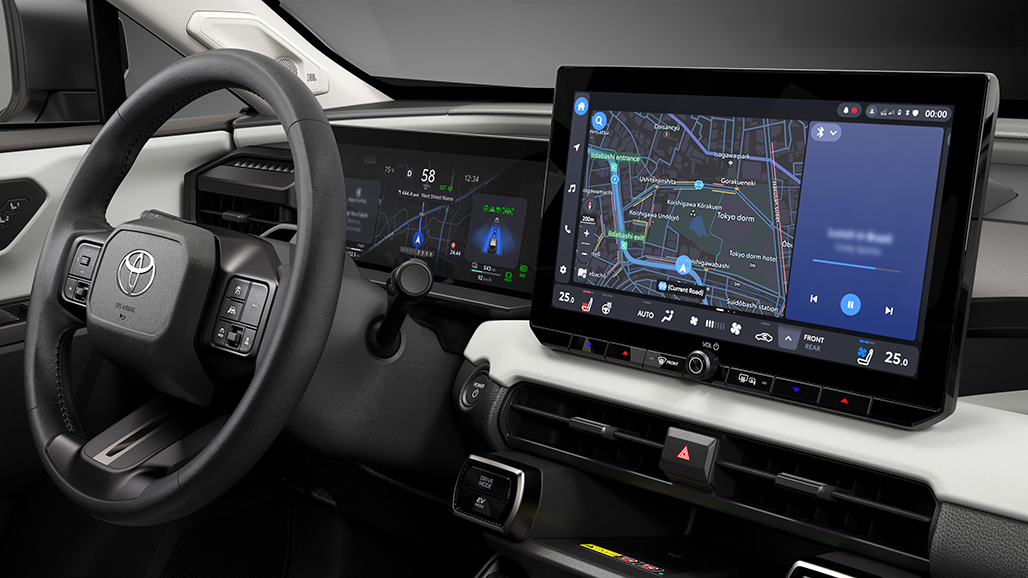
Toyota’s newest infotainment story is not just about a bigger screen.
It is about how the car, phone, cloud services, and driver controls work together.
The clearest current example is the 2026 Toyota RAV4, where Toyota puts its latest multimedia experience front and center.
For shoppers, the practical question is simple: what does this Toyota infotainment system make easier every day?
Fast Answer: What Toyota’s Newest System Is
Toyota’s latest Audio Multimedia setup is the brand’s current connected dashboard experience for navigation, media, phone projection, voice control, and vehicle services. In the 2026 RAV4 context, Toyota describes a new-generation multimedia system with available 10.5-inch and 12.9-inch touchscreen displays, wireless Apple CarPlay support, wireless Android Auto support, and connected-service features tied to Toyota accounts, trials, subscriptions, and network availability.
That makes it more than a radio replacement. It is the screen layer for common driving tasks: starting navigation, taking calls, switching audio, using supported smartphone apps, reading vehicle prompts, and accessing Toyota Connected Services where the vehicle and plan support them.
The important limit is this: Toyota’s system does not replace Apple CarPlay or Android Auto for everyone. It sits beside them. Many drivers will still spend most of their screen time inside phone projection, while Toyota’s built-in interface handles vehicle-specific functions and connected services.
Sources: Toyota 2026 RAV4 launch, Toyota 2026 RAV4 feature release, Toyota Audio Multimedia overview, Toyota Connected Services.
Why It Matters In Daily Driving
A good infotainment system fades into the background. A weak one makes every short drive feel more complicated than it should.
Toyota’s newest setup matters because the center screen is where several daily habits meet. You may start with a route, answer a call, change a podcast, check a vehicle alert, and switch between built-in navigation and phone projection during the same trip.
That is why screen size alone is not the whole story. A larger display helps only if the interface is readable, the phone connection is dependable, and the built-in services are clear about what works in the vehicle you are driving.
The 2026 RAV4 is a useful case study because it is a mainstream Toyota, not a low-volume technology showcase. When Toyota updates the RAV4 dashboard experience, it affects the kind of buyer who wants modern convenience without studying a manual for an hour.
How Toyota Audio Multimedia Works
Toyota Audio Multimedia is the vehicle’s built-in software environment for the center display. Depending on the model and configuration, it can support touchscreen controls, voice interaction, navigation-related services, smartphone projection, audio sources, account-linked connected features, and over-the-air service behavior described by Toyota.
In practical terms, there are three layers to understand.
The first layer is Toyota’s own interface. This is where vehicle-specific menus, Toyota services, and built-in multimedia controls live. It matters when you are adjusting car-related functions or using Toyota features that do not come from your phone.
The second layer is smartphone projection. Toyota lists wireless Apple CarPlay and Android Auto support in the 2026 RAV4 material. Apple describes CarPlay as a way to use iPhone features in the car, while Google describes Android Auto as a way to bring compatible Android phone apps and functions to a car display. Those systems depend on compatible phones, apps, vehicles, and regional availability.
The third layer is connected services. Toyota’s Connected Services page describes services such as Remote Connect, Drive Connect, Wi-Fi Connect, Safety Connect, and Service Connect, with availability, trials, subscriptions, app activation, and network conditions varying by vehicle and service.
That split helps avoid confusion. If maps from your phone look different from Toyota’s built-in navigation, that does not mean the Toyota screen is broken. You may simply be using a different software layer.
Sources: Apple CarPlay, Android Auto, Toyota Connected Services.
What Looks New In The 2026 RAV4 Context
Toyota’s official 2026 RAV4 material points to a more modern multimedia experience centered around the dashboard display. The available screen sizes are the most visible change, especially the larger 12.9-inch display referenced in Toyota’s RAV4 coverage.
The advantage is not just visual impact. A bigger, newer display can make maps, media controls, call information, and prompts easier to scan at a glance. That can reduce the tiny-tap feeling older infotainment systems often create.
Toyota also connects the RAV4 update to its broader software direction. The company has described newer multimedia development with a cleaner interface direction, cloud-connected capability, and underlying technology work tied to Toyota’s software platform strategy.
For a buyer, the takeaway is straightforward: the new RAV4 is one of the clearest places to see Toyota’s current infotainment priorities in a normal family SUV.
Practical Examples: What You Would Actually Use
The most common use case is navigation. Some drivers will prefer Toyota’s available connected navigation features where supported. Others will use Apple CarPlay or Android Auto wirelessly and rely on the map app they already know.
The second use case is audio. A driver may move between radio, phone audio, streaming apps through phone projection, and Toyota’s own interface controls. The best setup is the one that makes switching sources feel predictable.
The third use case is calls and messages. CarPlay and Android Auto are designed around phone-based communication, while Toyota’s built-in system still handles the vehicle display and audio routing. Compatibility and setup matter here, so a new owner should test calling, audio, and contact behavior while parked.
The fourth use case is connected vehicle features. Toyota’s services can include remote, safety, Wi-Fi, service, and drive-related features depending on the vehicle and plan. This is where the Toyota app and account setup become important, because some features are not just local screen buttons.
A useful first setup routine is simple: pair the primary phone, confirm whether CarPlay or Android Auto opens wirelessly, test one short navigation route, place a call while parked, switch audio sources, and check which Toyota Connected Services are active for that exact vehicle.
Common Mistakes To Avoid
The first mistake is assuming every Toyota model has the same screen, software, or service package. Toyota rolls features out by model, trim, market, and model year, so the correct reference point is the specific vehicle window sticker, owner’s resources, or Toyota’s current model page.
The second mistake is treating smartphone projection and Toyota’s built-in system as the same thing. If an app behaves differently in CarPlay than it does in Toyota’s own interface, that may be normal. They are related on the same screen, but they are not identical systems.
The third mistake is ignoring account and service status. Connected features may require Toyota app activation, a compatible vehicle, network availability, a trial, or a subscription after a trial period. If a feature is missing, the cause may be eligibility or setup rather than a broken screen.
The fourth mistake is buying only by screen size. A larger screen is useful, but the better question is whether your daily tasks are easy: routing, calling, audio, phone projection, and the Toyota features you actually plan to use.
Cost, Privacy, And Security Context
Toyota’s connected features can involve accounts, app activation, wireless communication, trials, and paid subscriptions depending on the service and vehicle. That does not make the system unusual, but it does mean buyers should separate built-in screen functions from connected-service functions.
Before relying on a feature, check whether it works locally through the car, through the paired phone, or through Toyota Connected Services. That distinction matters for cost and availability.
Privacy also deserves a practical approach. Connected vehicle features generally depend on data exchange between the vehicle, account, phone, service provider, and network. Toyota’s official Connected Services and privacy resources are the right place to review current terms for a specific service.
For security, keep the phone software current, use the Toyota app from official app stores, avoid sharing account credentials, and remove old paired phones before selling or handing over a vehicle. Those basic steps can prevent many avoidable account and pairing problems.
Is It Better Than Just Using CarPlay Or Android Auto?
For many drivers, the answer is not either-or.
Apple CarPlay and Android Auto are strongest when the driver wants familiar phone apps on the car display. Toyota’s built-in system is strongest when the driver needs vehicle-specific controls, Toyota services, and features tied to the car itself.
That is why Toyota’s newest infotainment system should be judged by how well it handles both jobs. It needs to support familiar phone projection while keeping Toyota’s own vehicle functions easy to find.
If you already live in Apple Maps, Google Maps, Spotify, podcasts, or phone-based messaging, wireless CarPlay or Android Auto may still be your daily home screen. If you use Toyota connected features, built-in navigation services, remote functions, or service information, Toyota’s layer matters more.
Who Benefits Most From Toyota’s Newer Setup?
The biggest winner is the driver who wants a mainstream SUV with a more modern screen experience and fewer cable-dependent habits.
It also helps households where more than one person drives the same vehicle. A clearer interface, wireless phone projection, and account-aware services can make the car easier to share, as long as phone pairing and profiles are managed carefully.
Tech-focused buyers may appreciate the larger display and newer software direction. Less technical buyers may appreciate something simpler: the screen looks current, supports the phone features they expect, and keeps important vehicle functions in one place.
The buyer who should slow down is the one comparing trims or services. Do not assume every display size, connected feature, or trial applies to every RAV4 configuration. Confirm the exact vehicle details before treating a feature as included.
Related Articles
- Toyota’s Infotainment System Sets the Standard: Review
- Toyota App Not Connecting to Car: Causes and Fixes
- Toyota Safety Sense: ADAS Features, Sensors, and Calibration
Bottom Line
Toyota’s newest infotainment system is best understood as a practical dashboard platform, not a standalone gadget.
In the 2026 RAV4 context, it brings Toyota’s current Audio Multimedia direction into a high-volume SUV with modern screen options, wireless phone projection, and connected-service support. The value is not that it replaces your phone. The value is that it gives the car a better center for phone, vehicle, media, navigation, and service features.
For most shoppers, the smartest test is simple: sit in the vehicle, pair your phone, start a route, make a call while parked, switch audio sources, and check which Toyota services are active. If those basics feel easy, the technology is doing its job.
FAQ
What is Toyota Audio Multimedia?
Toyota Audio Multimedia is Toyota’s built-in infotainment environment for the center display. Depending on the vehicle, it can support media, navigation-related services, voice interaction, phone projection, connected services, and vehicle-specific screen functions.
Does Toyota's newest infotainment system include Apple CarPlay and Android Auto?
Toyota’s 2026 RAV4 material lists wireless Apple CarPlay and wireless Android Auto support. Actual compatibility still depends on the phone, software, apps, vehicle configuration, and regional availability.
Do Toyota Connected Services cost extra?
Some Toyota Connected Services may involve trials, subscriptions, app activation, network availability, and vehicle eligibility. Check the exact vehicle and current Toyota Connected Services terms before assuming a feature is included long term.
Is the 12.9-inch Toyota screen standard on every RAV4?
Toyota describes 10.5-inch and 12.9-inch touchscreen availability in the 2026 RAV4 context, but feature availability can vary by trim, market, and configuration. Confirm the exact vehicle details before buying.
Should I use Toyota's built-in system or CarPlay and Android Auto?
Use both for their strengths. CarPlay and Android Auto are useful for familiar phone apps, while Toyota’s built-in system matters for vehicle-specific controls, Toyota services, and features tied directly to the car.