
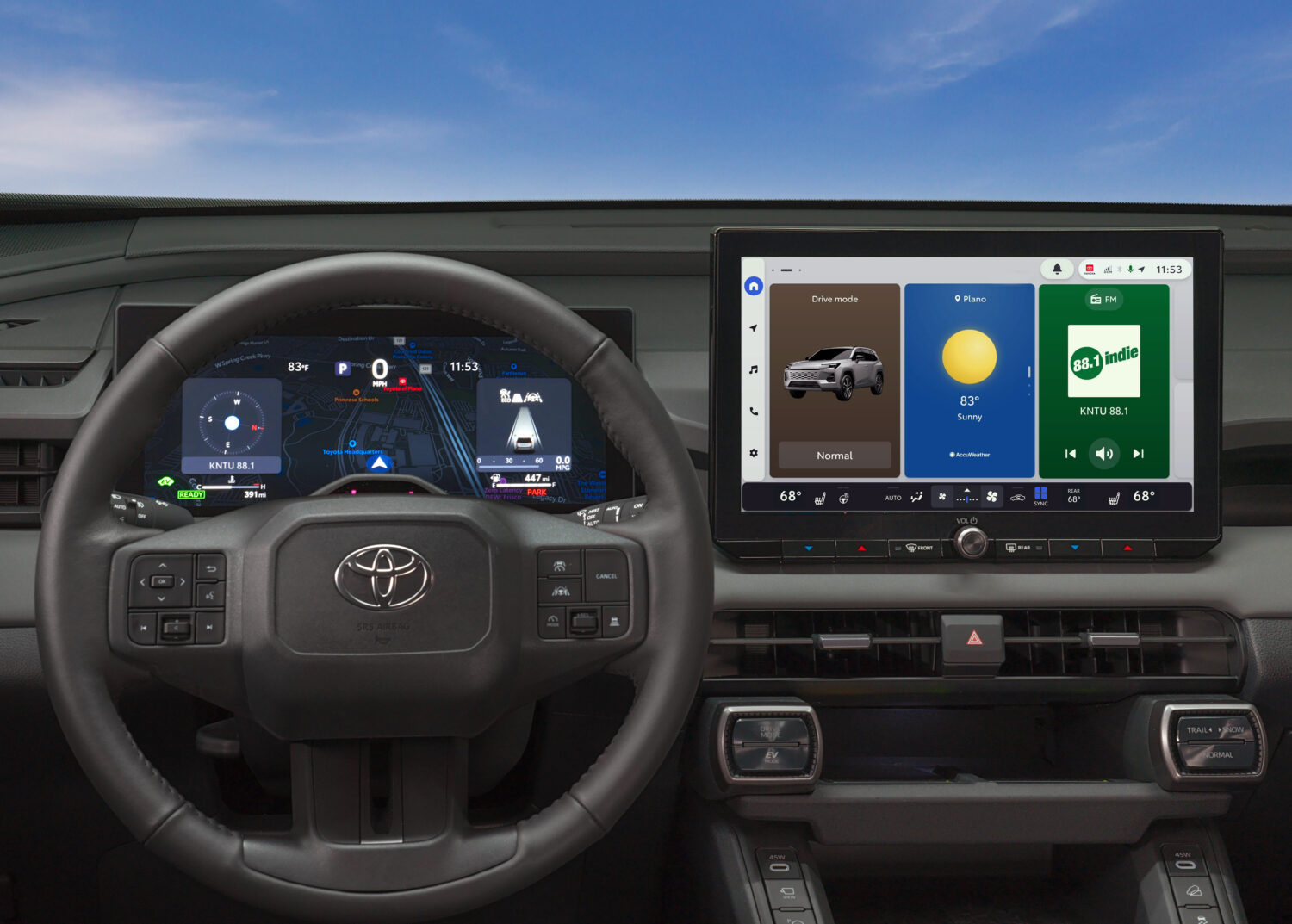
Toyota infotainment is not flashy for its own sake.
That is exactly why it works.
The best in-car screen should feel calm, quick to understand, and hard to misuse while driving.
Toyota’s current Audio Multimedia approach gets close to that standard by focusing on familiar controls, phone integration, connected services, and clear everyday
tasks.
The key is context. Toyota does not give every model, trim, market, or model year the same screen, software generation, trial package, or connected-service bundle. But when the latest Toyota Audio Multimedia system is properly equipped and set up, it shows why simple automotive software can be more useful than a screen filled with novelty.
Toyota’s own materials describe Audio Multimedia as the center for phone, media, navigation, voice, Bluetooth, and connected-service features, with availability depending on vehicle and service status. The company’s 2026 RAV4 multimedia update is a useful current example, because Toyota says the enhanced interface brings configurable widgets, larger available screens, wireless smartphone compatibility, and Toyota App integration to that model line. Toyota Connected Services and the Toyota USA Newsroom are the clearest official starting points.
Fast Answer: What Makes Toyota Infotainment Stand Out
Toyota’s infotainment system sets a strong standard because it keeps the driver’s main jobs close: navigation, calls, media, voice controls, smartphone projection, vehicle settings, and connected services.
It is not perfect, and it should not be judged as one identical system across every Toyota. A base trim, older model, or vehicle without an active service plan can feel very different from a new, well-equipped Toyota using the latest Audio Multimedia interface.
The standard Toyota gets right is more practical than dramatic. A good system should make it easy to pair a phone, return to the home screen, understand what is built into the car, know what depends on a phone, and see which services may need account activation, a trial, or a paid plan.
That matters more than screen size alone.
Why This Matters For Buyers
Infotainment now affects daily ownership. It is where drivers handle directions, podcasts, contacts, voice commands, vehicle messages, subscriptions, remote features, and sometimes charging or maintenance information.
A confusing screen can make a good car feel unfinished. A clear screen can make a modest commute feel easier.
Toyota’s advantage is that its interface generally aims for predictable tasks instead of novelty. The system still has learning curves, especially around Connected Services and phone projection, but the best versions do not make the driver hunt through layers for basic functions.
For shoppers, that means the real test is not whether the demo screen looks modern in a showroom. The real test is whether the system handles your normal routine without creating new chores.
How Toyota Audio Multimedia Works In Daily Use
Toyota Audio Multimedia is the brand’s central infotainment environment. Toyota describes it as the place where compatible vehicles can surface features such as Bluetooth, Apple CarPlay, Android Auto, Toyota App-linked services, navigation features, media, and available Connected Services. Exact availability depends on the vehicle, grade, equipment, phone, region, account setup, trial status, and subscription status. Toyota’s Connected Services page lays out the broad feature families.
In a typical daily-use scenario, the system has three overlapping layers.
First, there is the vehicle’s own interface: home screen, audio, settings, built-in menus, voice controls, and any Toyota navigation or Drive Connect features that are active.
Second, there is phone projection. Toyota’s support materials discuss Apple CarPlay and Android Auto setup through Toyota Audio Multimedia, while Apple and Android both note that vehicle and phone compatibility matter. That means a buyer should treat CarPlay or Android Auto as a supported compatibility feature, not as a promise that every cable, phone, model year, or wireless setup will behave the same way. See Toyota’s Apple CarPlay and Android Auto guide, Apple’s CarPlay support page, and Android’s Android Auto page.
Third, there are connected services. Toyota lists services such as Safety Connect, Service Connect, Remote Connect, Drive Connect, Wi-Fi Connect, and Integrated Streaming across its current connected-service materials. Some features may involve trials, subscriptions, compatible vehicles, Toyota App activation, or paid plans. Toyota’s Connected Services Plans page is the right place to check current plan framing before treating any feature as included.
That three-layer structure is why Toyota’s system can feel strong when configured well and confusing when a buyer assumes everything works the same way everywhere.
The 2026 RAV4 Shows Toyota’s Current Direction
Toyota’s 2026 RAV4 is a useful example of where the brand is taking infotainment. Toyota says the latest evolution of its multimedia experience launches with the 2026 RAV4 and highlights items such as available 10.5-inch and 12.9-inch screens, home-screen widgets, wireless Apple CarPlay and Android Auto compatibility for that example, Drive Connect context, and Toyota App integration. Toyota USA Newsroom published that update for the new RAV4 multimedia experience.
The important word is example.
The 2026 RAV4 does not prove every Toyota has the same screen, software, wireless behavior, navigation package, or connected-service bundle. It does show the design direction: fewer mystery menus, more glanceable home-screen information, and a stronger link between the car display and Toyota’s account-based services.
That is the right direction for mainstream drivers. People do not usually want a rolling tablet experiment. They want maps to load, music to resume, calls to connect, and service messages to make sense.
What To Test Before You Buy
A Toyota infotainment review is only useful if it turns into a practical test drive checklist. Do not judge the system from the parked home screen alone.
Start with your phone. Pair it during the test drive if the salesperson allows it, then watch how clearly the Toyota screen explains the next step. Try the connection method you expect to use most, whether that is wired or wireless on a compatible vehicle.
Next, check the difference between Toyota’s own interface and phone projection. If you rely on Apple Maps, Google Maps, Waze, Spotify, podcasts, or voice assistants, spend time inside Apple CarPlay or Android Auto. Then return to the Toyota interface and see whether the switch feels obvious.
Then look for the features that might require services. Remote start, vehicle status, connected navigation, Wi-Fi, streaming, and other app-linked features may depend on vehicle equipment, trial status, subscriptions, account setup, and service availability. Toyota’s Toyota App page and plan pages are better references than a vague showroom promise.
Finally, test the boring details. Is the text readable in daylight? Are climate or audio shortcuts easy to reach? Can a passenger understand the screen without coaching? Does the system recover cleanly if you disconnect and reconnect the phone?
Those small moments decide whether the system feels premium after a month.
Common Mistakes When Judging Toyota Infotainment
The first mistake is assuming one Toyota represents every Toyota. Toyota’s infotainment experience can vary by model year, trim, screen size, region, options, and software generation.
The second mistake is treating wireless phone projection as the whole review. Apple CarPlay and Android Auto are important, but the built-in Toyota interface still matters when you adjust settings, manage vehicle features, use Toyota services, or troubleshoot a connection.
The third mistake is ignoring account setup. Connected services often depend on Toyota App activation, account credentials, compatible equipment, active trials, or paid plans. If a feature matters to you, check it in Toyota’s current service materials before assuming it is permanently included.
The fourth mistake is overlooking privacy and transfer cleanup. Toyota’s Connected Services Privacy Notice describes categories such as vehicle location, driving data, vehicle health data, account information, app data, and device mirroring data in connected-service contexts. It also explains choices related to connected services and data transmission. Owners should understand those settings before selling, transferring, or sharing a vehicle. Toyota’s Connected Services Privacy Notice is the official source for that context.
Privacy, Security, And Cost Context
Toyota infotainment is no longer just a screen and a radio. It can connect a phone, an account, vehicle data, cloud services, and subscription features.
That is useful when everything is intentional. It is less useful when owners do not know which account is active, which phone is paired, which trial is ending, or which connected feature is using vehicle data.
For privacy, the practical move is simple: review Toyota’s privacy notice, understand which services are active, remove old phones when needed, and pay attention to account ownership when a vehicle changes hands.
For cost, avoid assuming a feature is free forever because it worked during a demo. Toyota’s Connected Services materials describe plans, trials, subscriptions, and select-vehicle limits for different services. Buyers should check the current plan page for the vehicle they are considering.
For security, keep the infotainment system boring in the best way. Use your own account, remove devices you no longer use, avoid leaving another person’s phone paired, and treat remote access features as account-controlled services rather than casual conveniences.
Where Toyota Still Has Room To Improve
Toyota’s strength is clarity, but the ecosystem can still feel fragmented. A buyer has to understand the difference between the car’s built-in screen, phone projection, Toyota App features, trials, subscriptions, and model-specific equipment.
That is a lot for a mainstream owner.
Toyota could make the experience even stronger by making service status, trial expiration, phone compatibility, and active account ownership more obvious inside the vehicle interface. Drivers should not need to decode marketing names to know why one feature appears and another does not.
The good news is that Toyota’s current direction appears focused on making the screen more glanceable and less distracting. The 2026 RAV4 example is a sign that Toyota understands the assignment: useful home-screen information, familiar phone support, and connected services that sit closer to the driver’s normal workflow.
Verdict: A Strong Standard, With Important Limits
Toyota’s infotainment system sets a strong practical standard when it keeps the driver’s core tasks visible and predictable.
It is not the most dramatic benchmark, and it should not be treated as identical across every Toyota. The better conclusion is more useful: Toyota Audio Multimedia, especially in its latest form, shows how a mainstream infotainment system can feel modern without making the driver relearn basic tasks.
That is the standard worth caring about.
A good car screen should help you drive, not compete with the road. Toyota is at its best when it remembers that.
Read More
- Toyota App Not Connecting to Car: Causes and Fixes
- Toyota Safety Sense: ADAS Features, Sensors, and Calibration
- Ford Explorer vs Expedition Infotainment Screens: What Buyers Should Compare
- Audi MMI Infotainment Explained: What Changed, What Works, and What Drivers Should Check
FAQ
Is Toyota Audio Multimedia the same in every Toyota?
No. Toyota infotainment features can vary by model, year, trim, market, screen size, equipment, phone compatibility, account setup, and service status.
Does Toyota support Apple CarPlay and Android Auto?
Toyota lists Apple CarPlay and Android Auto support for compatible systems, and Toyota’s setup guide covers both. Availability and connection behavior can still depend on the vehicle and phone.
Are Toyota Connected Services free?
Some services may include trials or be tied to specific plans, vehicles, or subscriptions. Toyota’s current Connected Services Plans page is the best official reference before buying.
Do I need the Toyota App for infotainment features?
Not for every screen function. But Toyota says the app is used for account-linked services, activation, vehicle information, and compatible remote or connected features.
What should I check before buying a Toyota for its infotainment system?
Pair your phone, test your usual maps and audio apps, switch between phone projection and Toyota’s interface, review service-plan status, and check whether the exact vehicle has the features you expect.